
Def MOD Pack




Opis moda
Ten mod aktywuje funkcjonalność DEF w symulatorze rolnictwa. Możesz zatankować DEF na dostarczonych obiektach.
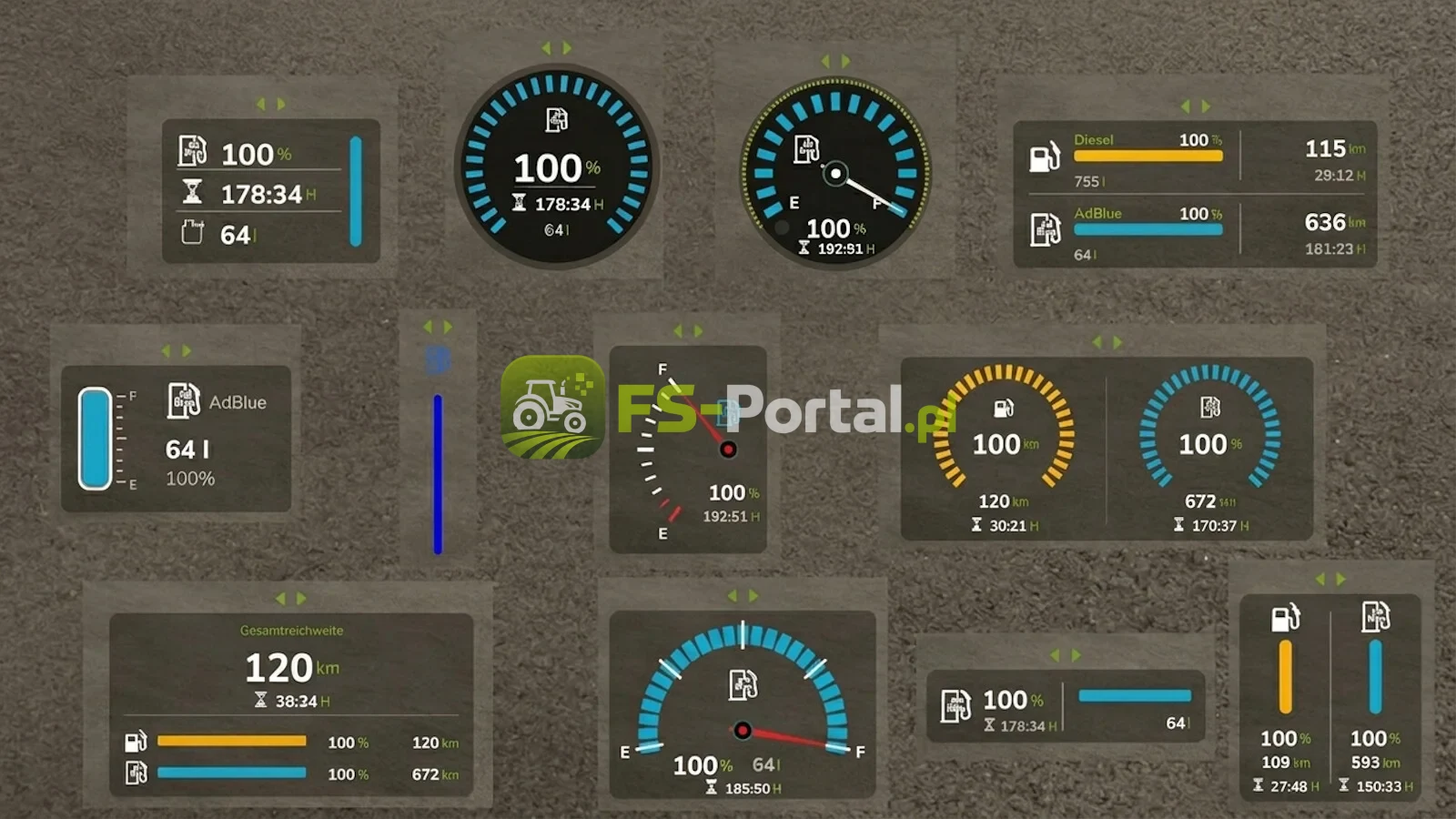
- Aby zmienić lub zmienić położenie wyświetlacza AdBlue / DEF, naciśnij CTRL + Y i przeciągnij wyświetlacz za pomocą myszki.
- Aby zmienić projekt wyświetlacza, kliknij na zielone trójkąty w trybie pozycji.
- Dostępne są następujące obiekty:
- Pojemnik 25 litrów, cena 32 $
- IBC pojemnik 2000 litrów cena 3200 $
- Stacja napełniania DEF
Cena: 5000 $
Dzienna konserwacja: 5 $
Autorzy moda
Historia zmian
V1.3.0.0
System zużycia AdBlue przerobiony
- Zużycie waży teraz realistycznie z obciążeniem silnika i jest w pełni zsynchronizowany w multiplayer.
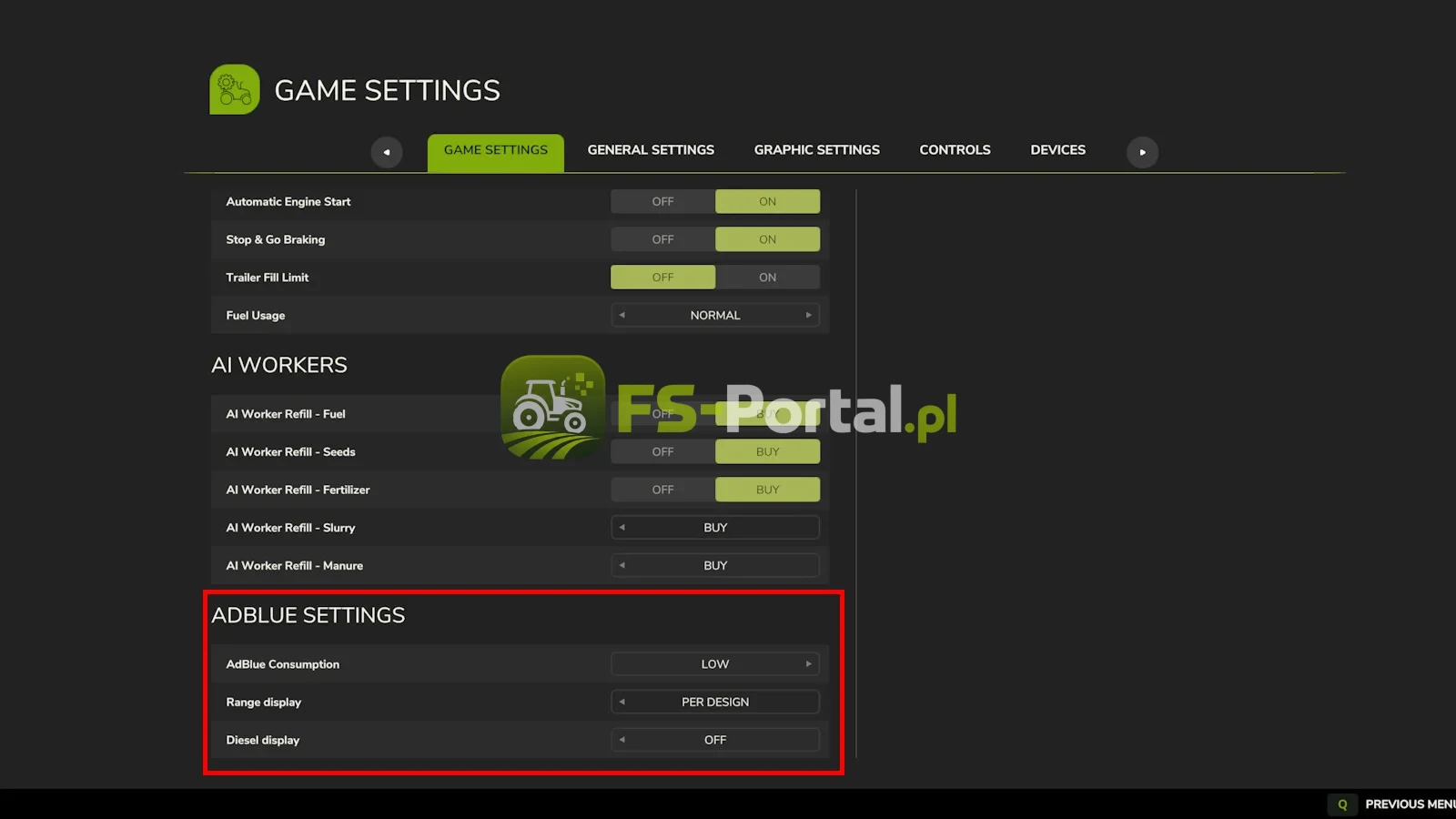
Nowe ustawienia gry AdBlue
- Wybierz między niskim, normalnym, wysokim lub niestandardowym poziomem użytkowania.
- Custom value can be informed directly and gets effect everybody - synced across all clients.
Ulepszone ograniczenie mocy silnika
- Kiedy AdBlue jest pusty, moc silnika jest automatycznie ograniczona do 10%.
- Dla gracza wyświetlane jest wyraźne ostrzeżenie HUD.
Nowe wizualizacje i projekty HUD
- Dodano wiele stylów wyświetlania AdBlue (Classic, Modern, ExtraBar, Szczegóły itp.).
- Zawiera migotanie ostrzeżenia, gdy zbiornik jest pusty, i poprawiony wskaźnik procentowy / poziom wypełnienia.
Pozostałe obliczenia zakresu
- Diesel i AdBlue pozostałe godziny są teraz obliczane i wyświetlane w czasie rzeczywistym, synchronizowane w multiplayer.
Stałe zachowanie oszczędzania zbiornika
- Usunięto automatyczne 10% uzupełnianie - zbiorniki teraz zapisać i ładować dokładne poziomy wypełnienia.
Dodano obciążenie silnika na biegu jałowym
- Silniki teraz utrzymać niewielkie wahania obciążenia (4- 5%) na biegu jałowym dla bardziej realistycznego zachowania.
Ogólna stabilność i poprawa wydajności
- Zoptymalizowana obsługa zdarzeń, zmniejszona wysokość i oczyszczone wyjście debugowania.
Wcześniejsze wydanie Starsza wersja
New HUD designs (all old bitmap designs were replaced by 12 new ones in the colors of the game HUD)
- Switch designs with CTRL+U or with the arrows in position mode.
- 8 AdBlue designs: Vertical (default), HUD Gauge, HUD Rows, HUD Strip, HUD Bar and two needle instruments like classic fuel gauges (E - F): HUD Needle gauge, HUD Needle gauge round (with warning lamp) and HUD Needle gauge vertical (narrow, like a dashboard fuel gauge).
- 4 combined Diesel + AdBlue designs with range in km: HUD Duo Bars, HUD Duo Rows, HUD Duo Gauge, HUD Duo Total (with total range).
- "HUD Bar" has no background and the same size and colors as the bars of the game HUD (icon + 6 x 130 px bar), so it can be dragged onto the HUD next to the diesel bar in position mode.
- New setting "Range display" (Settings > AdBlue): remaining range as time, in kilometres, or per design. Fuel icon is the original game style, AdBlue icon redrawn. Designs that looked alike (Round, Range, Needle gauge km) were removed.
- Range display in hours:minutes and in km (km = remaining time x average driving speed). Like a truck on-board computer, the remaining time is based on the average consumption of the last ~90 seconds and refreshed every 10 seconds (no more jumping values); right after engine start it shows "--" for the first 10 seconds.
- New warning banner at empty tank in the same style.
- Colors and panels now match the Air Brake mod / GIANTS look (colors converted to the game color format, black panel without border, AdBlue always blue).
- New setting "Diesel display" (On / Off): when off, the combined Diesel + AdBlue designs show AdBlue only.
- Design switch arrows now look like in the Air Brake mod: same light green (unit color of the game HUD), same size, centered above the display.
- The design arrows are now only visible in position mode (or while the mouse cursor is shown).
Fixes
- The AdBlue display disappeared after reloading a savegame.
- Engine power limit with an empty tank now really works (about 10 % power, it was only limiting the RPM before).
- Multiplayer: changed consumption settings of clients are now passed on to all players.
- The standard design is now applied correctly on a fresh install (warnings were missing).
- Position mode help text was invisible and described keys that do not exist.
- Position mode toggle could switch itself off again after entering or leaving a vehicle.
- Several smaller fixes (event registration, network traffic, log spam).
Wcześniejsze wydanie Starsza wersja
- Small improvement for DEF consumption (Thanks to BigFood2307 for the fix)
Wcześniejsze wydanie Starsza wersja
Various improvements and bug fixes
Custom key bindings for the AdBlue display can now be defined in the configuration file.
Pokaż 1 starsze wydania
Wcześniejsze wydanie Starsza wersja
System zużycia AdBlue przerobiony
- Zużycie waży teraz realistycznie z obciążeniem silnika i jest w pełni zsynchronizowany w multiplayer.
Nowe ustawienia gry AdBlue
- Wybierz między niskim, normalnym, wysokim lub niestandardowym poziomem użytkowania.
- Custom value can be informed directly and gets effect everybody - synced across all clients.
Ulepszone ograniczenie mocy silnika
- Kiedy AdBlue jest pusty, moc silnika jest automatycznie ograniczona do 10%.
- Dla gracza wyświetlane jest wyraźne ostrzeżenie HUD.
Nowe wizualizacje i projekty HUD
- Dodano wiele stylów wyświetlania AdBlue (Classic, Modern, ExtraBar, Szczegóły itp.).
- Zawiera migotanie ostrzeżenia, gdy zbiornik jest pusty, i poprawiony wskaźnik procentowy / poziom wypełnienia.
Pozostałe obliczenia zakresu
- Diesel i AdBlue pozostałe godziny są teraz obliczane i wyświetlane w czasie rzeczywistym, synchronizowane w multiplayer.
Stałe zachowanie oszczędzania zbiornika
- Usunięto automatyczne 10% uzupełnianie - zbiorniki teraz zapisać i ładować dokładne poziomy wypełnienia.
Dodano obciążenie silnika na biegu jałowym
- Silniki teraz utrzymać niewielkie wahania obciążenia (4- 5%) na biegu jałowym dla bardziej realistycznego zachowania.
Ogólna stabilność i poprawa wydajności
- Zoptymalizowana obsługa zdarzeń, zmniejszona wysokość i oczyszczone wyjście debugowania.
1.3.0.0
New HUD designs (all old bitmap designs were replaced by 12 new ones in the colors of the game HUD)
- Switch designs with CTRL+U or with the arrows in position mode.
- 8 AdBlue designs: Vertical (default), HUD Gauge, HUD Rows, HUD Strip, HUD Bar and two needle instruments like classic fuel gauges (E - F): HUD Needle gauge, HUD Needle gauge round (with warning lamp) and HUD Needle gauge vertical (narrow, like a dashboard fuel gauge).
- 4 combined Diesel + AdBlue designs with range in km: HUD Duo Bars, HUD Duo Rows, HUD Duo Gauge, HUD Duo Total (with total range).
- "HUD Bar" has no background and the same size and colors as the bars of the game HUD (icon + 6 x 130 px bar), so it can be dragged onto the HUD next to the diesel bar in position mode.
- New setting "Range display" (Settings > AdBlue): remaining range as time, in kilometres, or per design. Fuel icon is the original game style, AdBlue icon redrawn. Designs that looked alike (Round, Range, Needle gauge km) were removed.
- Range display in hours:minutes and in km (km = remaining time x average driving speed). Like a truck on-board computer, the remaining time is based on the average consumption of the last ~90 seconds and refreshed every 10 seconds (no more jumping values); right after engine start it shows "--" for the first 10 seconds.
- New warning banner at empty tank in the same style.
- Colors and panels now match the Air Brake mod / GIANTS look (colors converted to the game color format, black panel without border, AdBlue always blue).
- New setting "Diesel display" (On / Off): when off, the combined Diesel + AdBlue designs show AdBlue only.
- Design switch arrows now look like in the Air Brake mod: same light green (unit color of the game HUD), same size, centered above the display.
- The design arrows are now only visible in position mode (or while the mouse cursor is shown).
Fixes
- The AdBlue display disappeared after reloading a savegame.
- Engine power limit with an empty tank now really works (about 10 % power, it was only limiting the RPM before).
- Multiplayer: changed consumption settings of clients are now passed on to all players.
- The standard design is now applied correctly on a fresh install (warnings were missing).
- Position mode help text was invisible and described keys that do not exist.
- Position mode toggle could switch itself off again after entering or leaving a vehicle.
- Several smaller fixes (event registration, network traffic, log spam).
1.2.1.1
- Small improvement for DEF consumption (Thanks to BigFood2307 for the fix)
1.2.1.0
Various improvements and bug fixes
Custom key bindings for the AdBlue display can now be defined in the configuration file.
1, 0 0, 0
System zużycia AdBlue przerobiony
- Zużycie waży teraz realistycznie z obciążeniem silnika i jest w pełni zsynchronizowany w multiplayer.
Nowe ustawienia gry AdBlue
- Wybierz między niskim, normalnym, wysokim lub niestandardowym poziomem użytkowania.
- Custom value can be informed directly and gets effect everybody - synced across all clients.
Ulepszone ograniczenie mocy silnika
- Kiedy AdBlue jest pusty, moc silnika jest automatycznie ograniczona do 10%.
- Dla gracza wyświetlane jest wyraźne ostrzeżenie HUD.
Nowe wizualizacje i projekty HUD
- Dodano wiele stylów wyświetlania AdBlue (Classic, Modern, ExtraBar, Szczegóły itp.).
- Zawiera migotanie ostrzeżenia, gdy zbiornik jest pusty, i poprawiony wskaźnik procentowy / poziom wypełnienia.
Pozostałe obliczenia zakresu
- Diesel i AdBlue pozostałe godziny są teraz obliczane i wyświetlane w czasie rzeczywistym, synchronizowane w multiplayer.
Stałe zachowanie oszczędzania zbiornika
- Usunięto automatyczne 10% uzupełnianie - zbiorniki teraz zapisać i ładować dokładne poziomy wypełnienia.
Dodano obciążenie silnika na biegu jałowym
- Silniki teraz utrzymać niewielkie wahania obciążenia (4- 5%) na biegu jałowym dla bardziej realistycznego zachowania.
Ogólna stabilność i poprawa wydajności
- Zoptymalizowana obsługa zdarzeń, zmniejszona wysokość i oczyszczone wyjście debugowania.
Komentarze